
 zhuts
6a2a0ee5d7
1、上传数学库
zhuts
6a2a0ee5d7
1、上传数学库
|
hace 2 días | |
|---|---|---|
| controller_yy_app | hace 2 días | |
| controller_yy_app_controller_yy_board_flash_sdram_xip_debug | hace 2 días | |
| controller_yy_app_controller_yy_board_flash_xip_debug | hace 2 días | |
| controller_yy_board | hace 1 semana | |
| doc | hace 2 semanas | |
| .gitignore | hace 2 semanas | |
| README_en.md | hace 2 semanas | |
| README_zh.md | hace 2 semanas | |
| 环境搭建.pdf | hace 2 días | |
| 踩坑.md | hace 1 semana |
README_en.md
USER TEMPLATE
OVERVIEW
This project is a user template, and users can copy the folder to their custom working directory for development based on this template.
The user-defined files in this template are:
- User Board
- user App
- User Linker
User Board
In the user_board folder, there is a yaml file and a cfg file, and the names of these two files must be consistent with the folder name, so that start_gui can recognize the folder as a board folder.
Among them, the yaml file is a user board level configuration file used to configure SOC names, openocd scripts, etc. The cfg file is a board level configuration file for openocd, which specifies parameters for onboard flash, debugger reset-init event handling, debugger gdb-attach event handling, etc.
Usually, users can copy files from the hpm_sdk/boards/hpm_xxxx_evk directory to the user_board folder, and copy the cfg file from the evk directory of hpm_sdk/boards/openocd/boards to the user-board folder, and then make modifications based on their own board configuration.
- < Note >: After copying, please modify the file names of
yamlandcfgto match the folder name.
The files in the user_board folder in this template were copied from the relevant files of hpm6750evk2. Users can replace or modify them according to their own board configuration
User App
In the user_app folder, users can organize their own applications, such as the main function.
When adding .c and .h files, please use sdk_app_src to add the .c files and use sdk_app_inc to add the path of the .h files in CMakeList.txt.
If using middleware, components, etc., please refer to the CMakeList.txt in the sample corresponding to hpm_sdk, and then add relevant instructions in the user's CMakeList.txt following the example.
The cmake commands supported in the HPM_SDK can be viewed in hpm_sdk\docs\index_zh.html:
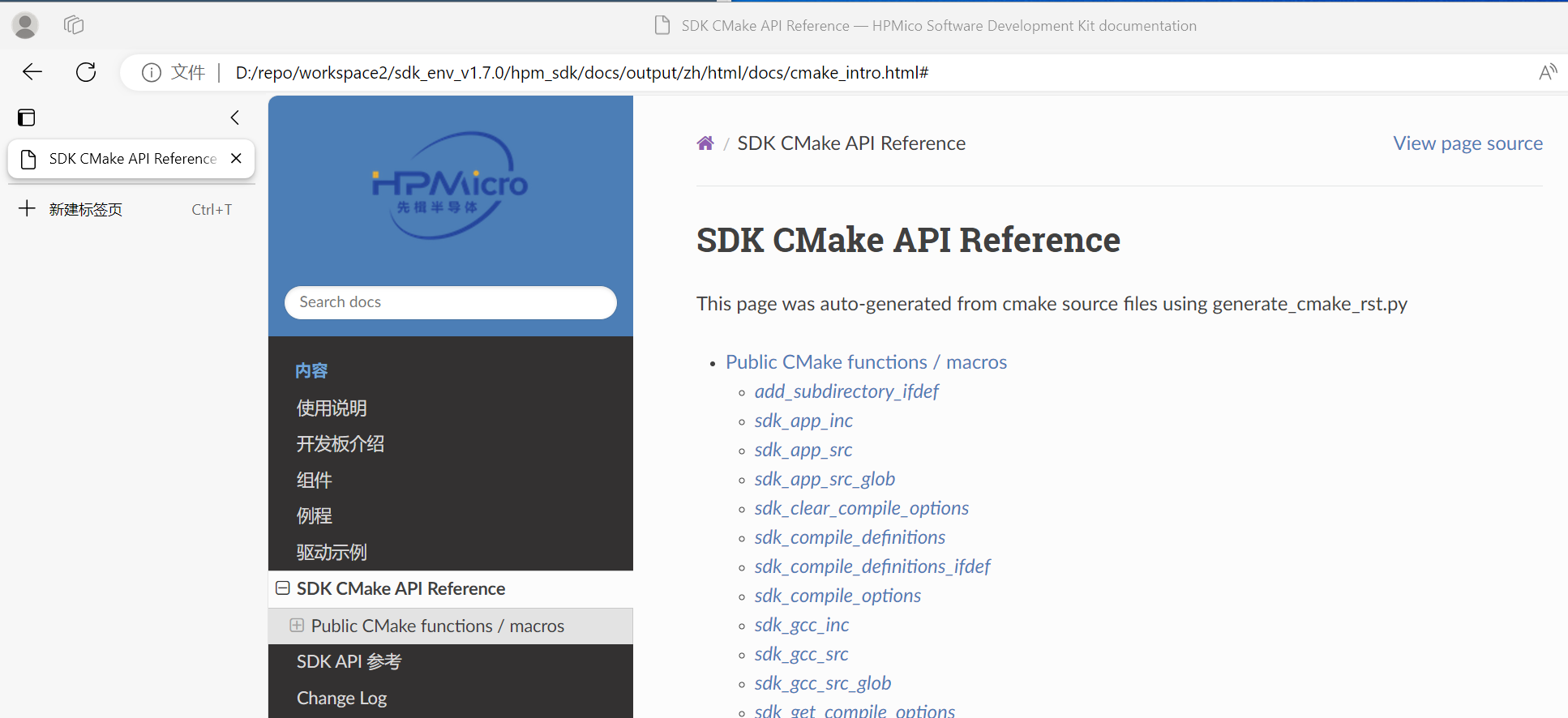
- Tips: After modifying
CMakeList.txt, the project needs to be regenerated and compiled.
User Linker
In the user_app folder, there are linker files for the application, which users can customize according to their own needs.
Usually, users can copy the linker files from the gcc/iar/segger folder in hpm_sdk/soc/xxxx/xxxx/toolchains to user app/linkers and make modifications based on them.
- < Note >: After copying, the linker file names under the
gcc/iar/seggerfiles should be consistent, only with different suffixes.
Users can specify the Linker file to be used in the user application's CMakeList.txt. If a Linker file is not specified in CMakeList.txt, it can also be specified when generating the project using start_gui Tool.
If a Linker file is not specified in either of the above cases, the SDK's default linker file will be used, which is located in hpm_sdk/soc/xxxx/xxxx/toolchains.
START_GUI DEMO
After organizing the above files, you can use start_gui to generate your own project project.
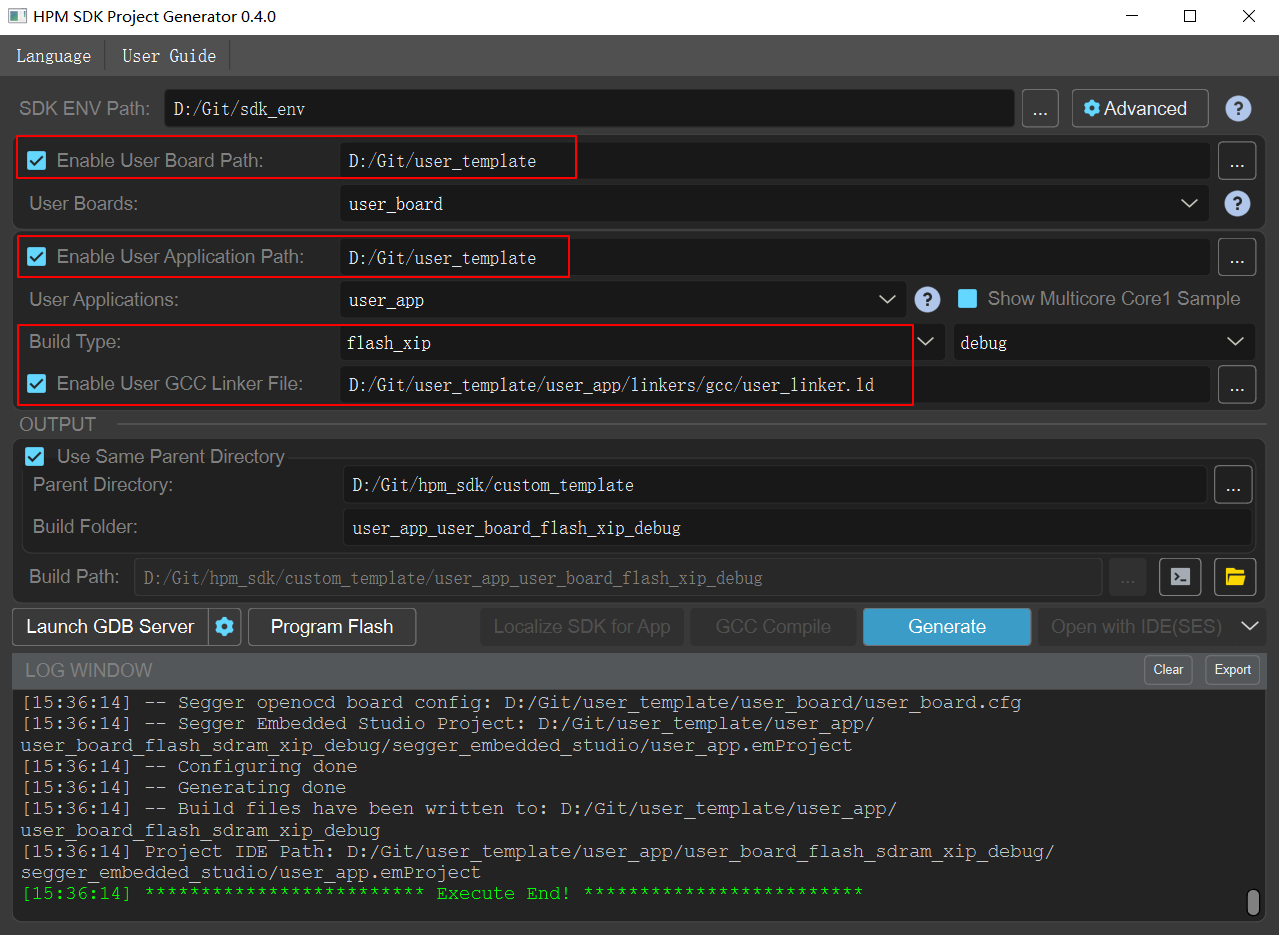
- Board Path:Specify the top-level
user_templatefolder, start_gui will automatically search for board level files in that folder. - Application Path:Specify the top-level
user_templatefolder, start_gui will automatically search for applications in that folder. - User GCC Liner File:Specify user
gcclinker files. After generating the project, the gcc toolchain will use the linker in the gcc folder, the iar toolchain will use the linker in the iar folder, and the segger toolchain will use the linker in the segger folder.- < Note >: The
Build Typeof start_gui needs to be correctly specified in conjunction with the linker file. For example, when the linker file uses Flash and there is no SDRAM, theBuild Typeof start_gui needs to be specified asflash_xip; When the linker file uses Flash and has SDRAM, theBuild Typeof start_gui needs to be specified asflash_stram-xip.
- < Note >: The
- After configuration, click
Generateto generate the project.- < Note >: After modifying
CMakeList.txt, the project needs to be regenerated and compiled.
- < Note >: After modifying