
 Andrew Tridgell
5d39278561
document param settings
Andrew Tridgell
5d39278561
document param settings
|
hace 3 años | |
|---|---|---|
| .github | hace 3 años | |
| RemoteIDModule | hace 3 años | |
| images | hace 3 años | |
| libraries | hace 3 años | |
| modules | hace 3 años | |
| releases | hace 3 años | |
| scripts | hace 3 años | |
| .gitignore | hace 3 años | |
| .gitmodules | hace 3 años | |
| BUILDING.md | hace 3 años | |
| COPYING.txt | hace 3 años | |
| README.md | hace 3 años |
README.md
ArduPilot RemoteID Transmitter
This is an implementation of a MAVLink and DroneCAN OpenDroneID transmitter. It aims to provide a transmitter solution for the FAA standard RemoteID requrement, meeting the transmitter component of the ASTM F3586-22 Means of Compliance.
Hardware Supported
The firmware currently supports the ESP32-S3 and ESP32-C3 chips. There are 4 boards supported so far with more to come:
- the ESP32-S3 dev board: https://au.mouser.com/ProductDetail/356-ESP32S3DEVKTM1N8
- the ESP32-C3 dev board: https://au.mouser.com/ProductDetail/Espressif-Systems/ESP32-C3-DevKitM-1
- a Bluemark DB110 (legacy) from https://bluemark.io/ (product page | buy)
- a Bluemark DB200 from https://bluemark.io/ (product page | buy)
Hardware from https://wurzbachelectronics.com/ is expected to be added soon.
For the ESP32-S3 dev board the pins assumed in this firmware are:
- UART TX on pin 18
- UART RX on pin 17
- CAN TX on pin 47
- CAN RX on pin 38
For the ESP32-C3 dev board the pins assumed in this firmware are:
- UART TX on pin 3
- UART RX on pin 2
- CAN TX on pin 5
- CAN RX on pin 4
For CAN a suitable 1MBit bxCAN transceiver needs to be connected to the CAN TX/RX pins.
You can also do MAVLink on the USB UART port (the one marked "UART" on the silkscreen). That allows for easy simulation testing by plugging in a micro USB cable.
See board_config.h and Makefile for information on porting to new boards.
Transmission Modes
This firmware supports the following transmission modes:
- WiFi NAN (Neighbour Awareness Networking)
- Bluetooth 4 Legacy Advertising
- Bluetooth 5 Long Range + Extended Advertising
Protocols
This firmware supports communication with an ArduPilot flight controller either using MAVLink or DroneCAN.
For MAVLink the following service is used: https://mavlink.io/en/services/opendroneid.html
For DroneCAN the following messages are used: https://github.com/dronecan/DSDL/tree/master/dronecan/remoteid
The DroneCAN messages are an exact mirror of the MAVLink messages to make a dual-transport implementation easy.
Releases
Pre-built releases are in the releases folder on github.
Flashing
For initial firmload load, to flash to an ESP32-S3 board use the espressif FlashTool from
https://www.espressif.com/en/support/download/other-tools
If this is the first time flashing the board, you may need to hold the "boot" button down while attaching the USB cable to the USB connector marked "USB"
and then use the pre-built binary in the releases folder to flash using the following options, after selecting the COMM port that the board is attached:
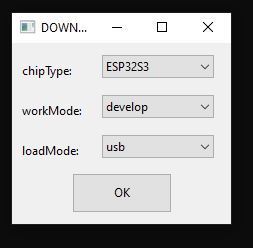

subsequent re-flashing of newer releases should not require holding the "boot" button during power-up of the board as the USB cable is attached.
DroneCAN Parameters
The firmware comes with a set of DroneCAN accessible parameters which control the behaviour of the board.

Key parameters are:
LOCK_LEVEL: this controls the lockdown of the board. If this is set to a non-zero value then all parameters updates via DroneCAN will be prevented. To change parameters (including the LOCK_LEVEL) once this is set you need to use a DroneCAN SecureCommand. There is an example script in scripts/secure_command.py which can change any parameter if you know a private key corresponding to one of the public keys
UAS_TYPE, UAS_ID_TYPE and UAS_ID: these override the IDs in the RemoteID BasicID packet when they have all been set. These should be set by the vendor before shipping the vehicle.
WEBSERVER_ENABLE: this enables the building WiFi access point and webserver for status monitoring and secure firmware update.
PUBLIC_KEY1 to PUBLIC_KEY5: these are the public keys that will be used to verify firmware updates and secure update of parameters
Web Server
The firmware comes with a builtin web server if the parameters WEBSERVER_ENABLE is set. The WiFi access point will use a SSID from WIFI_SSID and password from WIFI_PASSWORD which you can set with DroneCAN parameter tools such as the DroneCAN GUI tool or MissionPlanner CAN tool.
The web server has a secure firmware update mechanism which will only allow a properly signed firmware with a signature corresponding to one of the 5 public keys in the parameters. If no public keys are set then any firmware can be loaded.
The web server defaults to URL http://192.168.4.1 once you connect to the WiFi access point.
Firmware Signing
To generate public/private key pairs please use:
scripts/generate_keys.py
the keys are compatible with the ArduPilot secure boot system. By default the 3 ArduPilot release public keys are included.
Once you have generated a public key you can add it to the RemoteID node using a DroneCAN parameter editor. Make sure you keep the private key in a secure location.
To upload a firmware via the web server you need to use an "OTA" (Over The Air) firmware, which is generated as OTA files in the build. You then need to sign it with a private key corresponding to one of the public keys on the RemoteID node.
To sign an OTA firmware you should use a command such as this one:
scripts/sign_fw.py ArduRemoteID_ESP32S3_DEV_OTA.bin MyName_private_key.dat 1
The '1' on the end is the BOARD_ID. See board_config.h for the board IDs for your board.
Once signed you can upload the firmware via the web server.
ArduPilot Support
Support for OpenDroneID is in ArduPilot master and is also in the 4.2.3 stable releases and 4.3.x releases. You need to enable it on a board by setting "define AP_OPENDRONEID_ENABLED 1" in the hwdef.dat for your board or by using --enable-opendroneid when doing waf configure.
Credit
Many thanks to the great work by:
- OpenDroneID: https://github.com/opendroneid/
- Steve Jack: https://github.com/sxjack/uav_electronic_ids
- Roel Schiphorst: https://bluemark.io/
- David Buzz: ESP32 CAN and bluetooth drivers
This firmware builds on their work.
License
This firmware is licensed under the GNU GPLv2 or later